Knowledge Base
Comparing a Scan Against the Model with BIM Compare
The model says what the building was meant to be. The scan says what it is. BIM Compare gives you the short list of places they disagree, and a way to record what you decided about each one.
Where it lives
BIM Compare is its own collapsible section under Reality Capture, with a badge counting the findings it holds. Open a capture and its findings are already there. You do not need to run anything to read what a previous run found.
Press Run BIM Compare only when you want a fresh comparison. A run replaces this capture's findings, so anything recorded against the old set goes with it.
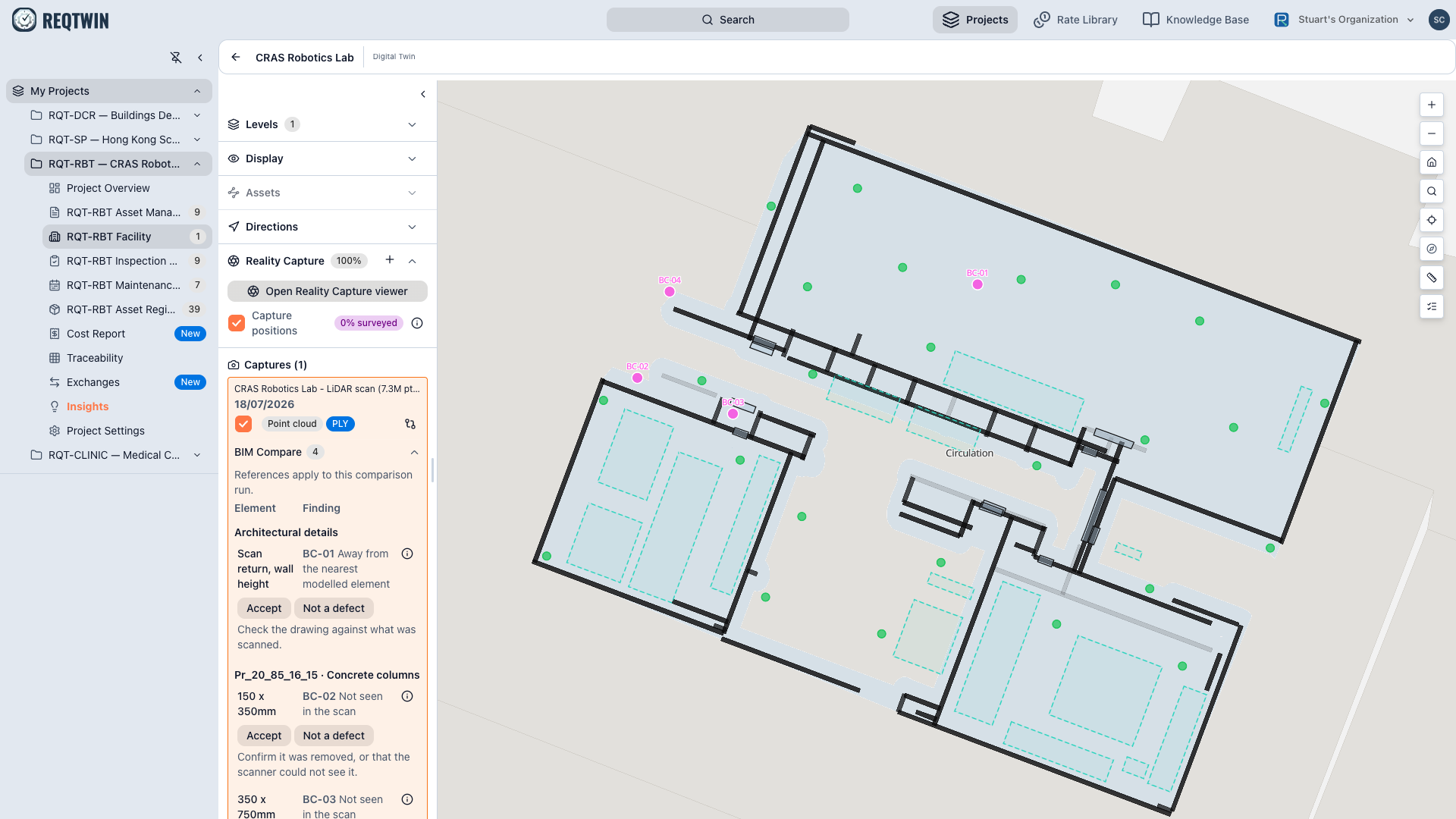
The BIM Compare section open under a capture, findings grouped under a Uniclass heading, each row carrying Accept and Not a defect.
Reading a finding
Findings group under a heading naming what they are about. Where the subject is classified, that heading carries the Uniclass code and its title together, for example Pr_20_85_16_15 · Concrete columns, so it identifies the product rather than making you infer it. Where it is not, the heading names the kind of thing instead, for example Architectural details.
Rows themselves are terse on purpose. The row tells you the subject and what is wrong with it. The measurement, and what corroborates it, sit behind the row's i, so the list stays scannable and the evidence stays one click away.
| What the row says | What it means |
|---|---|
| Not where it was drawn | The scan found it, somewhere other than the model puts it |
| Expected but not seen in scan | The model has it, the scan found nothing there |
| A compliance finding | A verdict the level's walls already carry, brought into the same list |
The subject is named honestly. Where a subject came out of the scan rather than the model, the row says so plainly, for example Scan return, wall height rather than Wall, because a return off a surface is not the same claim as a modelled element.
Following a finding to the place it came from
Click a row and the plan locates it. With the Reality Capture viewer open, selecting a finding also aims the viewer at the station that saw it and draws a view cone on the plan from that station, so both panes are pointed at the same thing. Click again to clear.
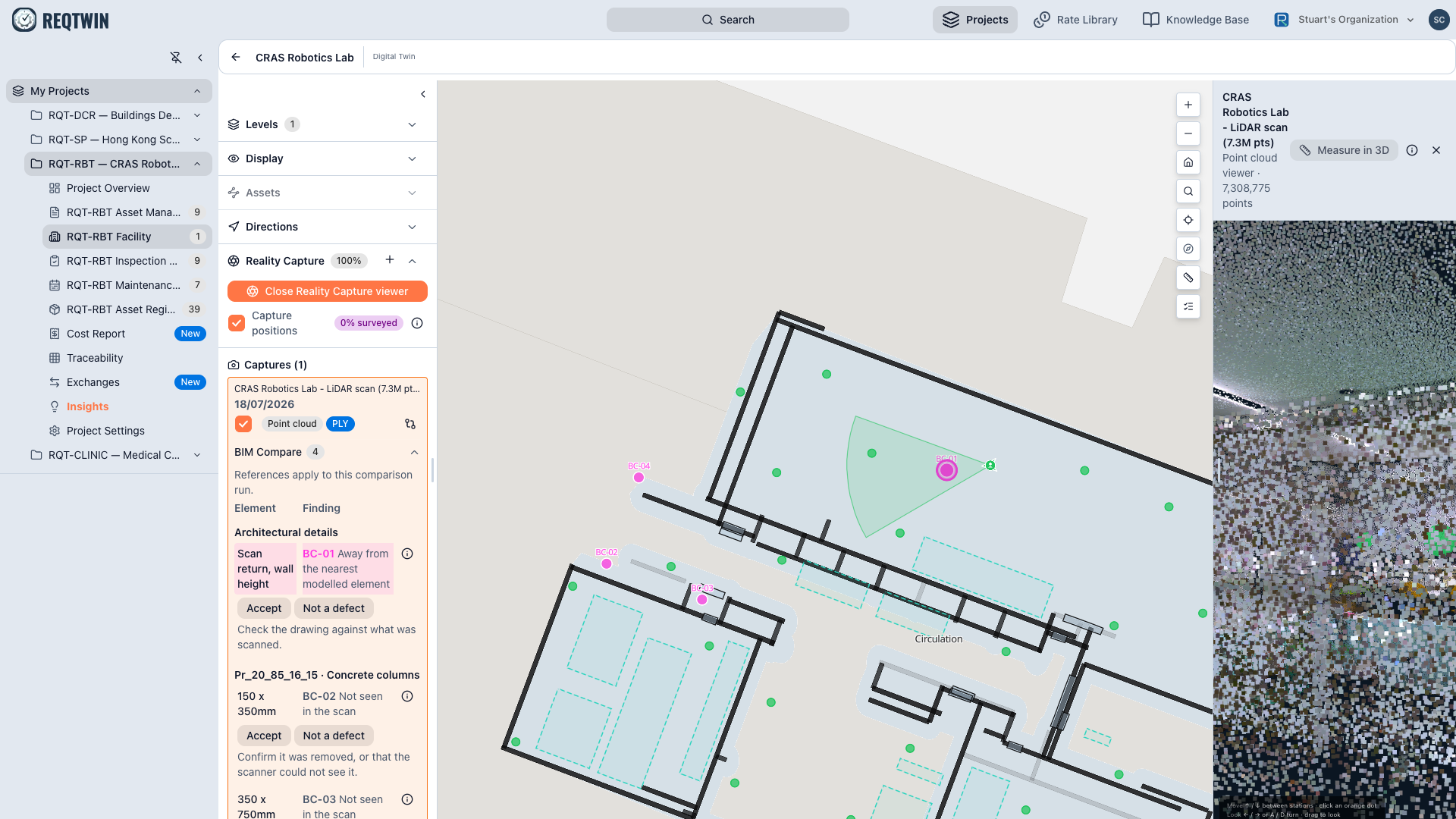
A finding selected: the plan draws a view cone from the station that saw it, and the capture viewer is aimed at the same place.
Accepting or rejecting
Every row carries Accept and Not a defect, always visible, no selection needed.
| Decision | What happens |
|---|---|
| Accept | The finding stays in the list with an accepted badge |
| Not a defect | The finding stays in the list with a rejected badge |
Two things worth knowing. A decision never removes the finding: there is no hide-reviewed filter, so you can always see what you already judged. And a decision does not survive a re-run, because a run rewrites the findings it owns.
A decision is a label, not a repair. Nothing here moves a modelled element onto where the scan found it. Deciding what is wrong is the job this panel does; correcting it still happens in the model.
Why a small disagreement is not reported
The scan was measured on site and the model was drawn, so before anything can be compared the two have to be fitted together. That fit is never perfect, and how imperfect it is can be measured. Even where the scan and the model genuinely agree, expect them to sit roughly that far apart.
So a finding is judged on two things, not one:
| Band | Meaning |
|---|---|
| Inside your tolerance | Not reported at all. It is compliant |
| Past tolerance, inside the fit's own error | Borderline. A real measurement, close to the noise floor |
| Past both | Likely real |
Borderline does not mean low quality. It means the measurement is sound and its cause is not established. Treat one as a confirmed defect and you may be arguing with the alignment rather than with the building. Findings are ordered by confidence, so the top of the list is the hardest to argue with.
What it needs
A georeference anchor on the facility, so the scan and the model share a coordinate frame.
At least one modelled wall on the level to register against.
Known limits
The comparison is wall geometry at room height. Measured ceiling height is reported but not compared against anything.
Compliance findings are carried through, not recomputed.
The fit's error figure is currently a fixed constant rather than measured per capture, so read the confidence bands as calibrated for the reference facility.
A finding reference such as BC-01 belongs to one run and is not a stable citation. Do not quote one in an email a week later.