Knowledge Base
Reading the Import & Version Report
Upload a model and ReqTwin tells you two things: did it come in cleanly, and what changed since last time.
Did it come in cleanly
The moment an import finishes, the upload dialog shows a checklist. Each line is green, amber, or red, and a line only appears when it has something to say.
| Check | What it answers |
|---|---|
| Georeference and site | Did the building land in the right place on Earth? |
| Import fidelity | Did everything the file declared actually get written? |
| Declared vs persisted | Do the counts match, class by class? |
| Source capture | Did each element arrive with its properties, or only its shape? |
Georeference sits first because it changes how you read everything else. An unedited Revit template puts a building on Boston City Hall Plaza, and one real facility was imported there three times before anyone noticed. The check goes amber and tells you. It never blocks the import.
If something failed after the rows were saved (a door not cut into its wall, a wall hidden for being implausibly thin), a line appears for that too, and says plainly that nothing was lost: the original geometry is kept, and re-importing fixes the drawing.
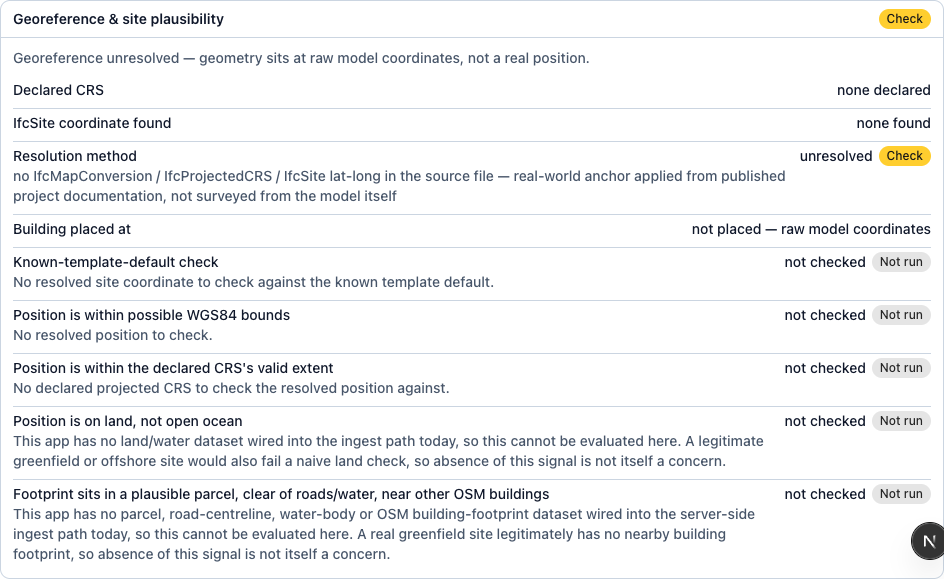
The import checklist, with a green pass on fidelity and an amber flag on georeference.
What changed since last time
Re-upload a facility and ReqTwin treats the file as a new version, not a replacement. Every room, detail, and asset is matched to what you already have by its source id.
| Verdict | Meaning | What ReqTwin does |
|---|---|---|
| Added | In this file, not in the last one | Drawn on the map |
| Changed | Present in both, and different | Drawn, and listed for review |
| Removed | In the last file, absent from this one | Kept. Flagged, never deleted |
| Unchanged | Identical | Left alone |
Removed never means deleted. A file cannot tell a demolition from an export that only covered one discipline, and guessing wrong is not recoverable. So the element stays exactly where it is and the report says it is absent from this file. If a quarter or more of the building goes missing at once, the report stops reporting removals as fact and says suspected partial export instead.
Changed elements are listed with the ones that matter most at the top: doors, stairs, lifts, railings and landings first, because a compliance result may have been worked out against the old shape. Anything still on the map has a View on map link beside it.

The version delta, showing Added, Changed and Removed counts for a re-import.
What it cannot tell you yet
The version delta knows that an element changed, not what changed about it. It compares a fingerprint of each element, not the individual measurements, so it can say a door is different and cannot yet say it moved 300 mm or grew 100 mm wider.
Field-level before-and-after is planned. Until then, use View on map to see the element as it is now.